Building my AI harness in 2026

Valentin Haudiquet
Software Engineer
I am building my own AI harness in late 2026. At first, I thought "This is just giving read, edit and commands to an AI model, right? How hard could it be?". Well, nowadays there are a lot of smart techniques implemented in most harnesses. And it is definitely a lot harder than I thought.
Along the way, I discovered how model APIs and tool calling worked, decided to give the model only bash, and chose to skip compaction altogether by progressively blurring the older parts of the conversation instead.
The basics
At its core, an AI harness is composed of three things:
- A model loop. Send a request to the model, evaluate output, until the model sends an "end of turn" marker.
- A provider API client. Implements the "send a request to the model" part. Usually, APIs are all OpenAI-compatible or Anthropic-compatible.
- Tools. This is what makes the AI "agentic". It gives the model functions that it can call to act. This is why we have a model loop: the model sends an answer containing a tool call, which can be a simple special token that gets intercepted by the harness, executed locally and the output is sent back to the model. This loops forever until the model is done with tool calls and sends a final tool-less reply, ending the turn.
The interaction with the agent continues in a user-feedback loop: the user sends an initial prompt, the agent calls all the tools it needs to understand and fulfill the prompt, then gives a last message to the user, who can send another prompt in response, in a conversational manner. That user loop continues until either the user is satisfied, or the context window of the model is full.
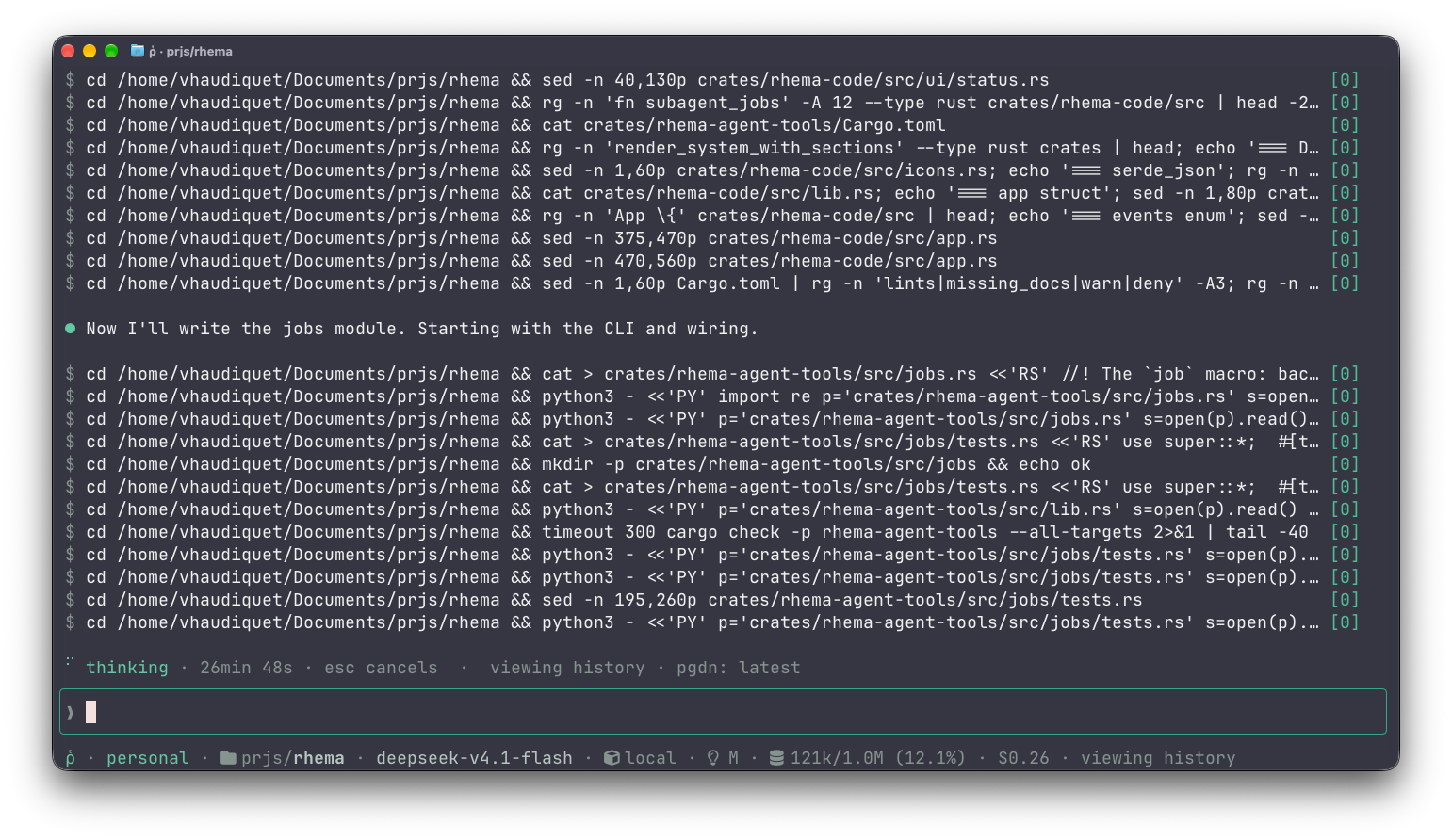
A model calling tools in Rhema Code.
Every time the conversation grows and the user sends a new prompt (or a tool call result), the whole conversation and tool results are re-sent to the model. After reading multiple files and spending multiple turns, this can become a large amount of data. Each model can only support a limited amount of data as input: its context window. It is measured in tokens, which is basically the "letters" or "words" representation of the model (technically, tokens depend on the tokenizer that the model uses, but you can think of it as 4-characters groups). Nowadays most big coding models can support 1M tokens as context window.
This means that context management is an important job for a harness. As the conversation gets bigger, it costs a lot more money. If it gets too big, it will just abruptly stop.
I have made a terminal user interface (TUI) called Rhema Code, and the underlying harness is a Rust framework divided into multiple "crates", modular, called Rhema. The rhema-host-agent crate implements the harness, wiring rhema-xxx dependencies together, with each dependency providing specific features.
Providers API
Let's take an example to see what talking to a provider really looks like under the hood.
OpenAI, but also DeepSeek, OpenRouter, llama.cpp (local models) and many others implement an "OpenAI-compatible" API. Usually, this means a chat completion endpoint:
POST /v1/chat/completions
Here is an example of a full JSON payload for an initial message at the start of a new session:
{
  "model": "your-model-here",
  "messages": [
    {
      "role": "system",
      "content": "Full system prompt of the harness goes here :)"
    },
    {
      "role": "user",
      "content": "First user message of the session."
    }
  ],
  "tools": [
    {
      "type": "function",
      "function": {
        "name": "bash",
        "description": "Run a bash command",
        "parameters": {
          "type": "object",
          "properties": {
            "command": {
              "type": "string",
              "description": "The bash command to run."
            }
          },
          "required": ["command"]
        }
      }
    }
  ]
}
As you can see, the API is pretty simple. One thing to notice is that tool calls have become so common that we are not just asking the model in the system prompt to "pretty please use tools using X custom format", instead the API natively encodes tool calling and tool results using JSON schema to describe tools themselves.
Tools
So, once we have a way to do tool calls and speak to models, we need to provide actual tools to the model.
Toolset
A minimal set of tools, like the set provided by the Pi coding agent, consists of:
read, reads the content of a filewrite, writes content to a fileedit, precise targeted text replacementsbash, execute bash commands
As you can see, this is quite an arbitrary set of tools. This one seems to come from the idea that a coding agent will mostly do two things: operate on text files (read, write, edit) and run terminal commands.
Using a single bash tool alone allows models to read, write and edit files as well (using tools like cat, grep, sed, echo, etc.). In fact, in my own harness, I only provide bash. More on that later.
As you can see, choosing the set of tools is not an exact science, and it comes down to what models will prefer. Providing too many, too specific tools to a model is pointless because the model will just use bash commands everywhere instead of the fancy tool. Some harnesses provide a grep tool that is a bit more optimized, but it has been seen that most models ended up ignoring it to directly use the grep executable through bash, which led to a line in the system prompt steering the model to not use grep through bash.
MCP
What if you need more tools? You may want your coding agent to help you build PCBs in KiCad, design 3D models with Blender, draw Excalidraw diagrams, etc. You can't possibly bake all tools inside the harness by default. Users want to plug their tools in.
The first answer for this could be "easy, my harness gives a full shell access to the model, I'll just ask the model to use the CLI". This is a very correct answer for when you actually have a good CLI. For example, if you want your model to write GitHub PRs for you, follow your GitHub notifications, create repos, and other GitHub-related things: just use the GitHub CLI gh, and potentially a SKILL.md file teaching the model how to use it.
However, for the examples that I gave, like KiCad PCB building, Blender model design or Excalidraw drawing, there is no CLI that could help. Fortunately, we have another solution.
MCP, for Model Context Protocol, allows extending the toolset of a harness with custom tools. This way, an MCP server in KiCad exposes specific tools (and optionally prompts and resources) via JSON-RPC. The MCP client in your harness can connect to it and directly add all of the advertised tools to its native toolset.
This way, users can natively extend and customize the toolset of a harness without modifying it.
Code mode
However, MCP as-is presents a big problem. It is easy for users to start adding around 10 MCP servers, each providing around 5 native tools, which results in exposing 50+ tools to the model. In reality, the GitHub MCP has around 90 tools on its own.
Providing many tools is detrimental for models.
Models can struggle to choose the right tool when presented with such variety. That slows down their thinking and bloats the context.
Presenting each tool separately also does not allow composition of multiple tools: sometimes the individual output of each tool is not useful for the model, and it would want to write a "script" chaining multiple tools and only looking at the final output.
This is the idea behind code mode.
It was first introduced by Cloudflare in Code Mode: the better way to use MCP. Cloudflare thought of code mode as a TypeScript API to expose MCP server calls (instead of the raw MCP tools).
This has multiple benefits:
- Models will write TypeScript instead of a custom tool calling syntax, which they have had more examples to train on in the wild
- TypeScript has a lot more expressivity and allows scripting and compositing tools
- An API can allow for progressive disclosure. Say you have 10 MCP servers, you can advertise those to the model in the API, without advertising each individual tool, but instead providing an API call to dynamically discover each tool. This makes unused servers use fewer tokens in the context window.
So instead of exposing each tool individually in the tool list, the harness exposes a generic codemode tool that takes TypeScript code as its argument. The TypeScript API would be dynamically exposed and resolved by the harness itself, backed by its MCP connections.
This needs the harness to programmatically build an API definition, but also to ship a sandboxed runtime in order to run codemode and be able to resolve in that sandbox its specific API. TypeScript here was just Cloudflare's example: in theory, any language could work.
Different approaches have been taken: Pi uses QuickJS, OpenCode built their own interpreter for a JS-like language, and the field is evolving.
Code mode through bash
I told you before that I only provided bash in my harness.
For basic tools like edit, read, grep but also "web fetch" (i.e., curl), bash already has the composability benefits of code mode:
curl https://api.api/query | jq '.field.description' | grep 'something'
MCP servers through bash
MCP servers go through bash, through one command: mcp. The client is an independent CLI, mcp-cli. Rhema runs mcp prompt at session start and puts the output in the system prompt:
MCP servers installed:
- vectorcraft: draw and edit diagrams
The model discovers the rest from the command:
$ mcp vectorcraft --list
[{"name":"draw","description":"Draw a diagram from a prompt"},
 {"name":"export","description":"Export the current diagram"}]

$ mcp vectorcraft draw --help
--prompt <PROMPT>    What to draw

$ mcp vectorcraft draw --prompt "Draw the letter a in a creative way"
{"content":[{"type":"text","text":"..."}]}
This is done by an MCP-to-CLI conversion layer, which takes the API of the MCP server as input and translates it to an abstract "CLI interface".
Each server is a subcommand, and each tool is a subcommand of the server. The tool's JSON Schema are mapped to flags: scalars become flags, arrays repeat, and an object becomes JSON (for now).
mcp is a standalone client that runs in the sandbox. It reads a sandbox-owned config.json, starts stdio servers there or connects to HTTP ones, and speaks JSON-RPC.
This is the opposite of the idea that is presented in What is Codemode by Armin Ronacher. Here in Rhema, mcp servers are pure sandbox, not a host/harness concern.
Vision through bash
I also implemented a see tool that models can call:
### Viewing images

You can view images by piping bytes into see, or by passing file paths:

curl -sL https://example.com/photo.png | see
see screenshots/capture.png

Staged images attach to that bash call's result and you see them as images.
Formats: png, jpeg, gif, webp; up to 5 MB per image.
Extract from Rhema Code system prompt describing the see tool to the model.
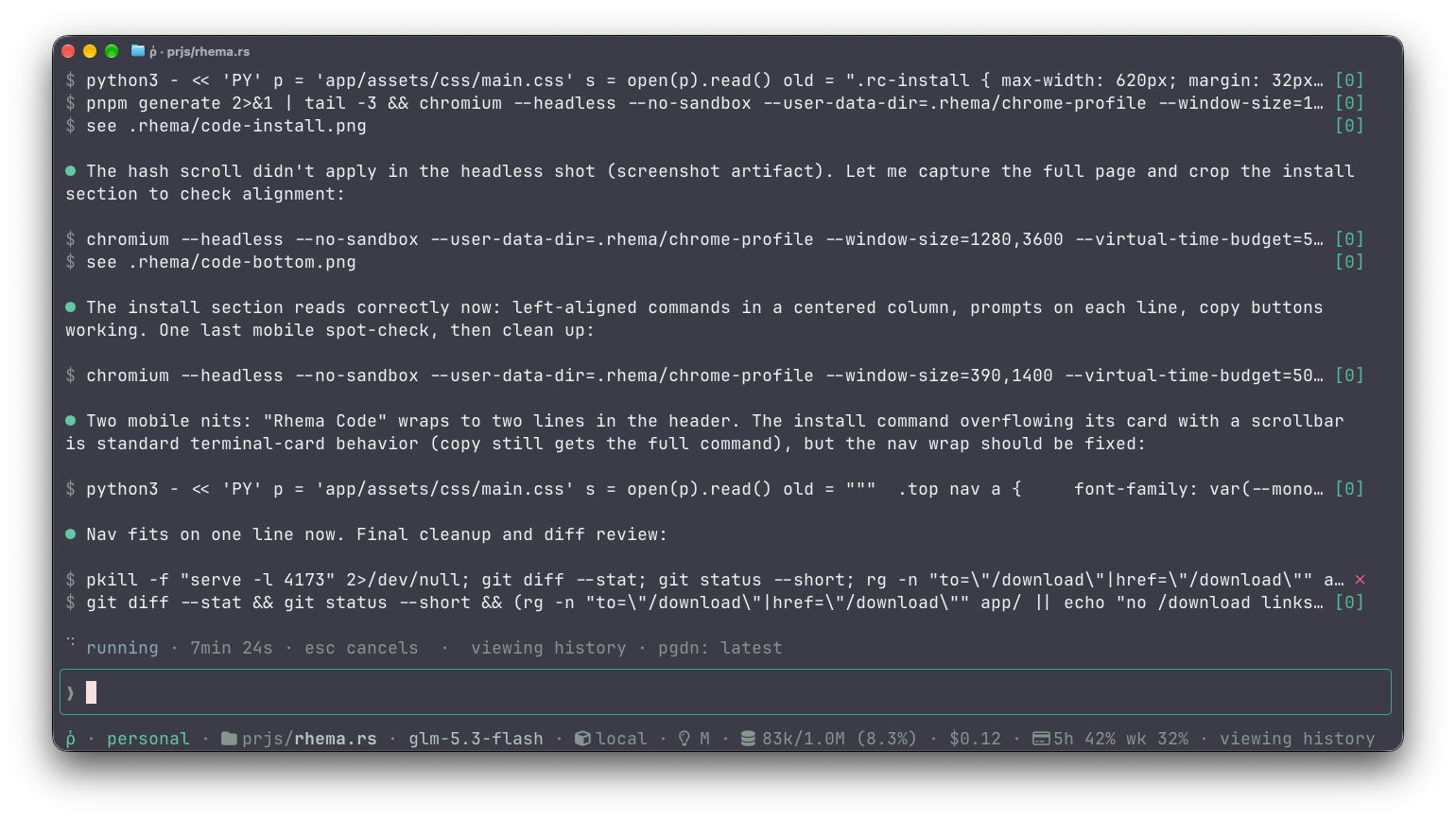
After finishing a frontend edit, the model uses headless chromium to get a screenshot of the rendered page, and uses see to look at that screenshot.
More through bash
We now have a really powerful bash tool, supercharged with MCP servers, and a tool to see images. Many other tools are implemented like that, for example calling system 1 models like Jev and Clef through a bash wrapper. But we also need the model to know which other native tools it can call.
Rhema does automatic environment discovery (Linux vs macOS, architecture, etc.), and presents hints about specific programs if it finds them installed. It checks for jq, yq, ripgrep (rg) and others, and instructs the model to prefer/use those when they are installed.
On top of that, Rhema implements a "background / long-running job management" tool inside bash. By default, models are a bit lost for that and call stuff like nohup, then sleep by incrementing intervals until something appears in the log file they watch. This is not very good.
Instead, utilities like gob can be exposed to the model to give them a real background-job management tool. Instead of exposing it directly, Rhema does it using a shim job command, which it also intercepts in order to allow the user to see and control those jobs from an interface.
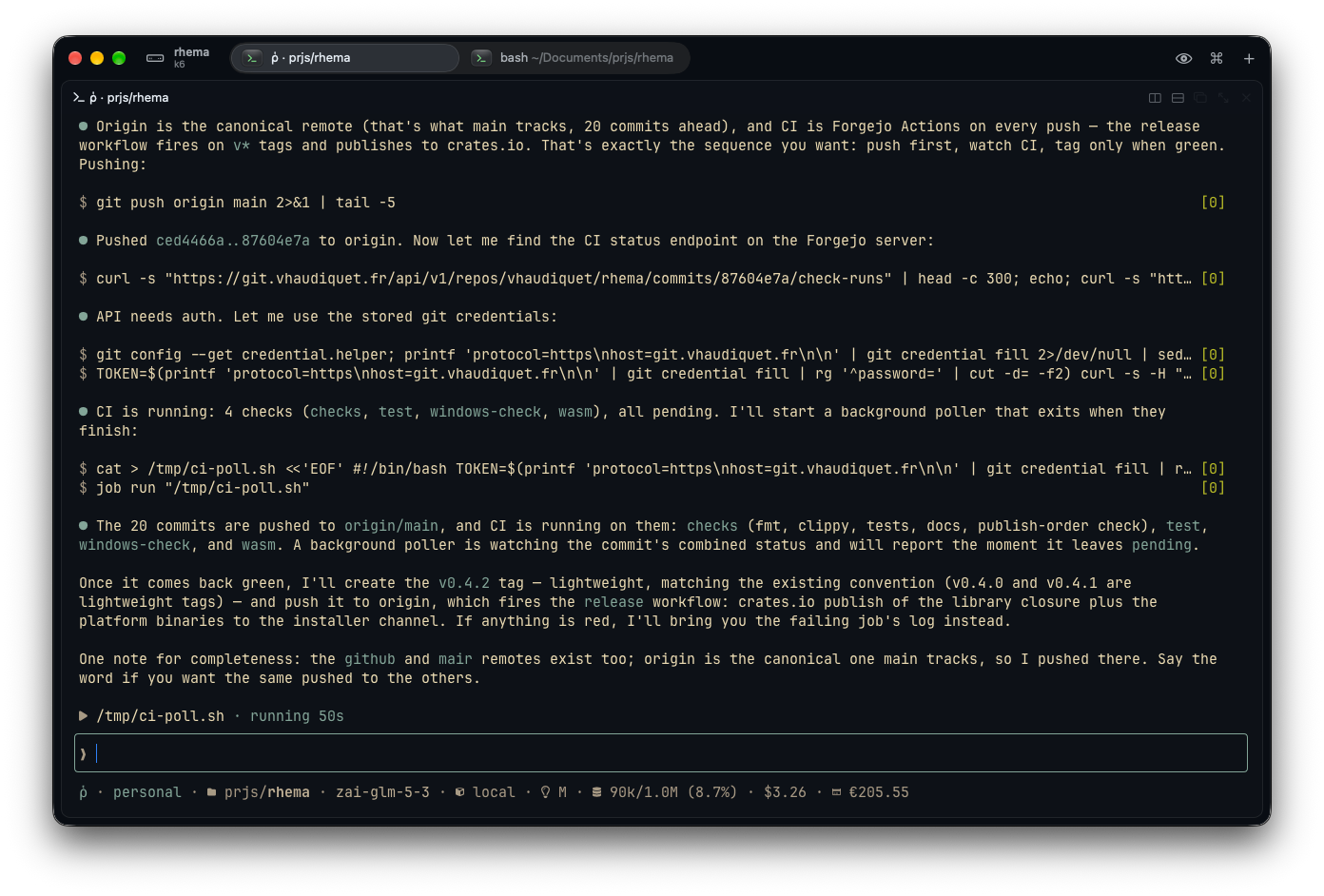
The model using a background job to poll for a CI run. At the end of the job, a notification is sent and the model wakes up automatically.
bash can be supercharged with any other tool that the user has, as long as the tool is installed and a skill or system-prompt override is present to tell the model that the tool is there (and it will call --help on its own if it wants to use it).
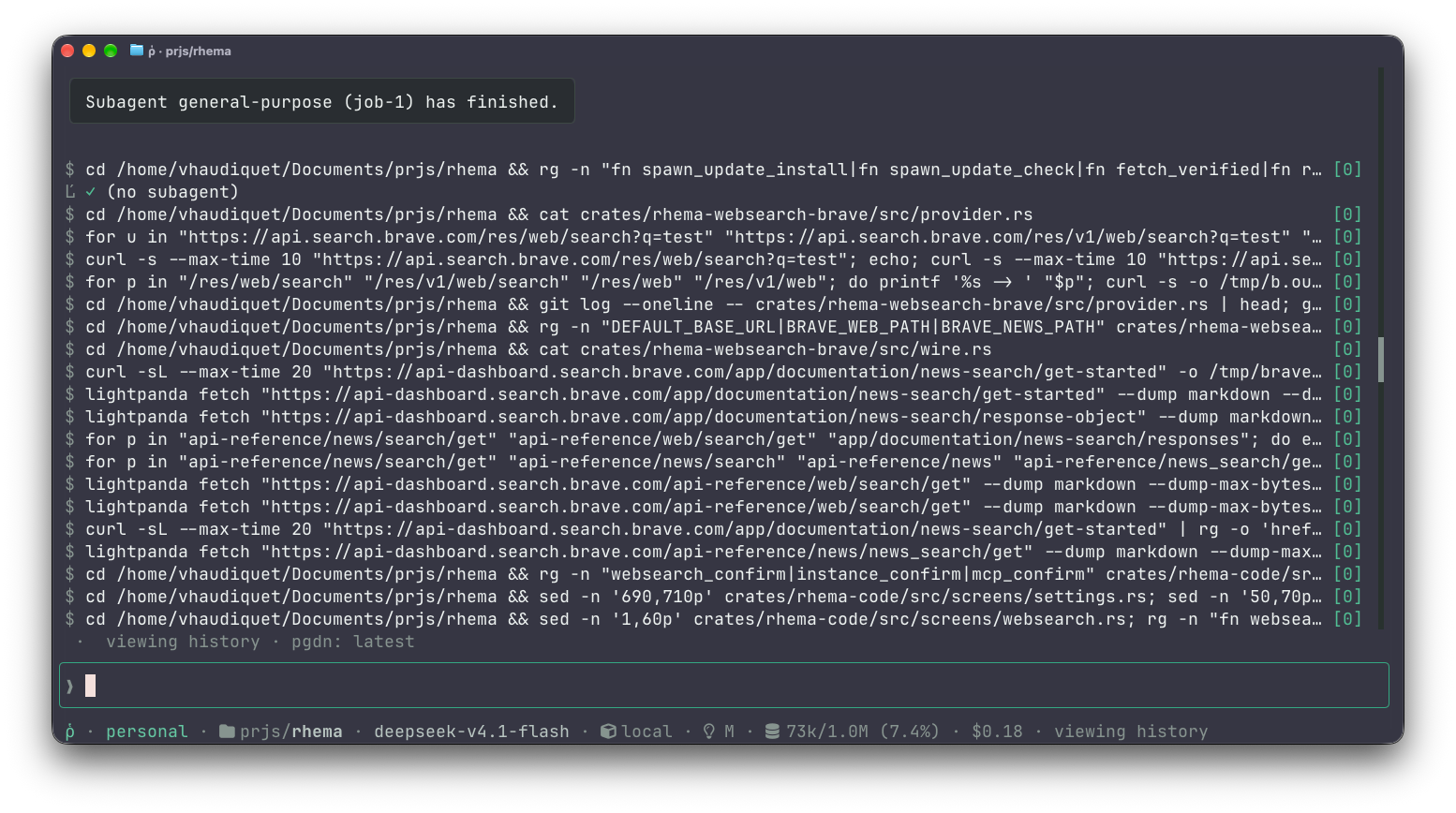
The model uses lightpanda in Rhema Code to browse a documentation web page.
Compaction
Basics
Until recently there was only one thing you could do: start another conversation, explaining to the new agent what you were doing and where you left off. If you anticipate this a bit, you can ask your current agent, right before the window fills up, to summarize what is left to do as a prompt for a new agent, a handoff prompt.
However, that is not very practical. With all the tool calls and the data read by the agent, surely some of it might be redundant in the current session and we could get rid of it. That is the idea behind compaction.
Compaction appeared as a harness /compact command. Calling the command instructs the model to make a summary of the current discussion, and then uses that summary instead of the real history for the next request, which drastically diminishes context usage. However, too much information can be lost when doing that, which makes the model behave badly. It misses details and hallucinates more.
I will not go into details about compaction strategies. Many different strategies have been developed, from the most basic to the weird and elaborate ones (read Snapcompact: SoTA compaction by Can Bölük for an example).
Caching
Another mechanism to understand is prompt caching. When you have a conversation with a model, you will send multiple times the same growing prefix with your input.
Each step, i.e. each time a request is sent to the model's API (user prompt, tool call), the previous steps are sent as well. Those will not change.
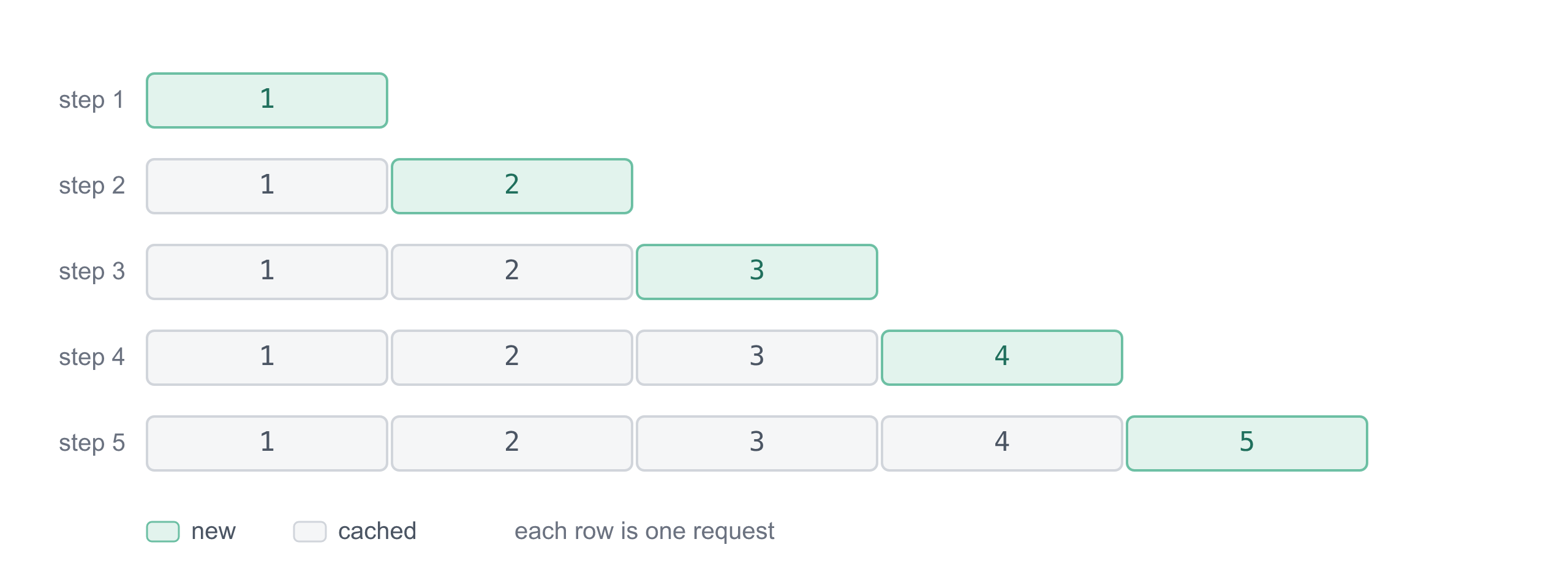
Prompt caching: each step resends the previous steps as a cached prefix and appends only the new one.
The content that the model has already seen is cached, and is billed at a fraction of the cost of the new content. Input cache hit tokens are very cheap. So compaction must not be too aggressive as to break caching, and the prefix must be stable enough as well.
For example, OpenCode used to put the daily date in system prompt. This allows the model to know what date it is, which is nice, but breaks prompt caching at midnight, because the very start of the cached prefix suddenly changes.
So whether it is during compaction or in its system prompt, a harness must try to make the prefix as stable as possible to benefit from prompt caching.
Blurring the transcript
Rhema does not implement traditional compaction. It blurs the older part of the conversation instead. The old messages become short digests, only the recent messages are sent full. The model can always zoom back to an original message.
Most of a coding conversation is tool output. In a typical session, file reads, build logs, and test output account for most of the tokens.
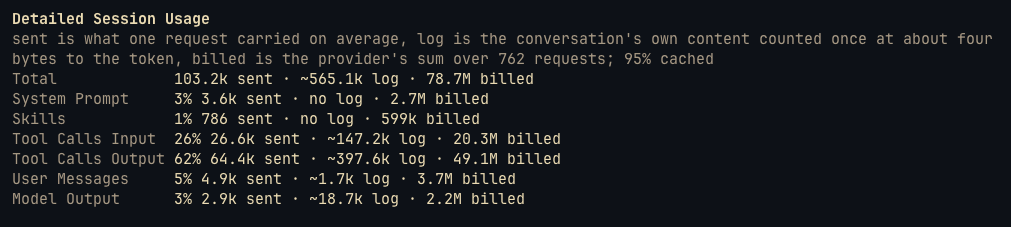
A typical coding conversation: tool call outputs (mostly what the model reads) account for 62% of token usage, while inputs (mostly what the model writes) are 26%. The rest is negligible.
That output is also the easiest to drop. An agent reads files to understand the codebase, then makes a change; it rarely needs the same file contents again. If it does, one cat brings the file back, and if it wants the older state, zoom is there.
So the older messages do not need a model-written summary of that. Rhema can drop the output and keep a summary of the tool call instead.
Below the budget (256 KB by default), the view is a pass-through: the message list is identical to the log.
Above that budget, the request has four parts:
- System prompt, which stays the same for the session
- One
<transcript>message, the block: the old prefix, split into sections and condensed - The recent messages, from the cut (the end of the block) to the current turn
- The current turn
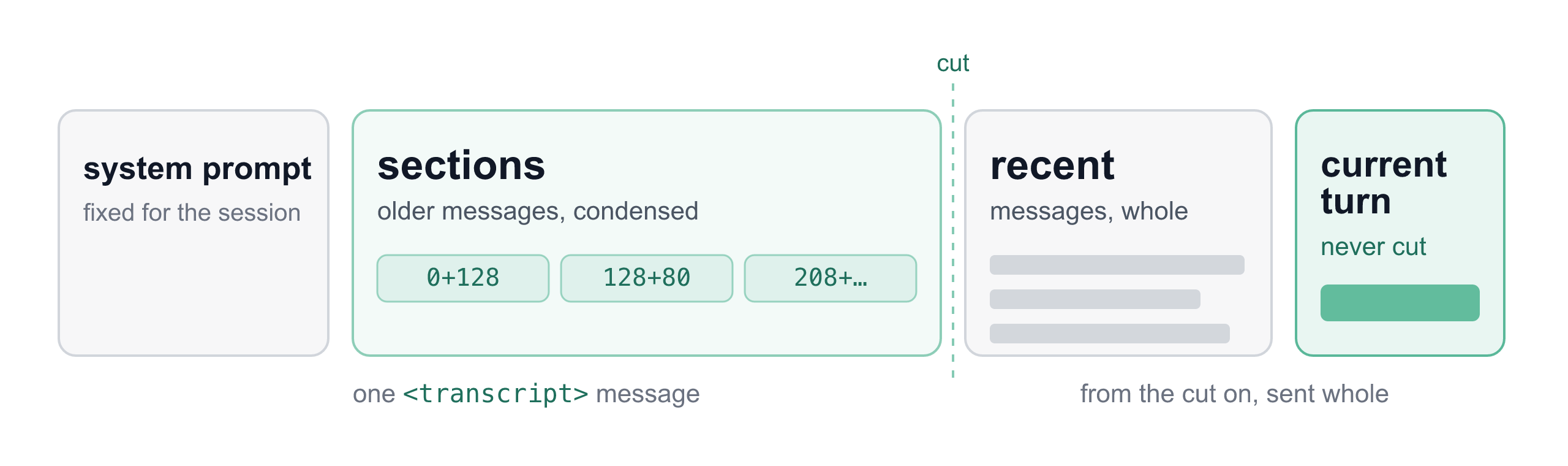
The request: a fixed system prompt, one <transcript> message that condenses the old prefix into sections, then the messages from the recent band sent unmodified. The current turn comes right after and integrates that band.
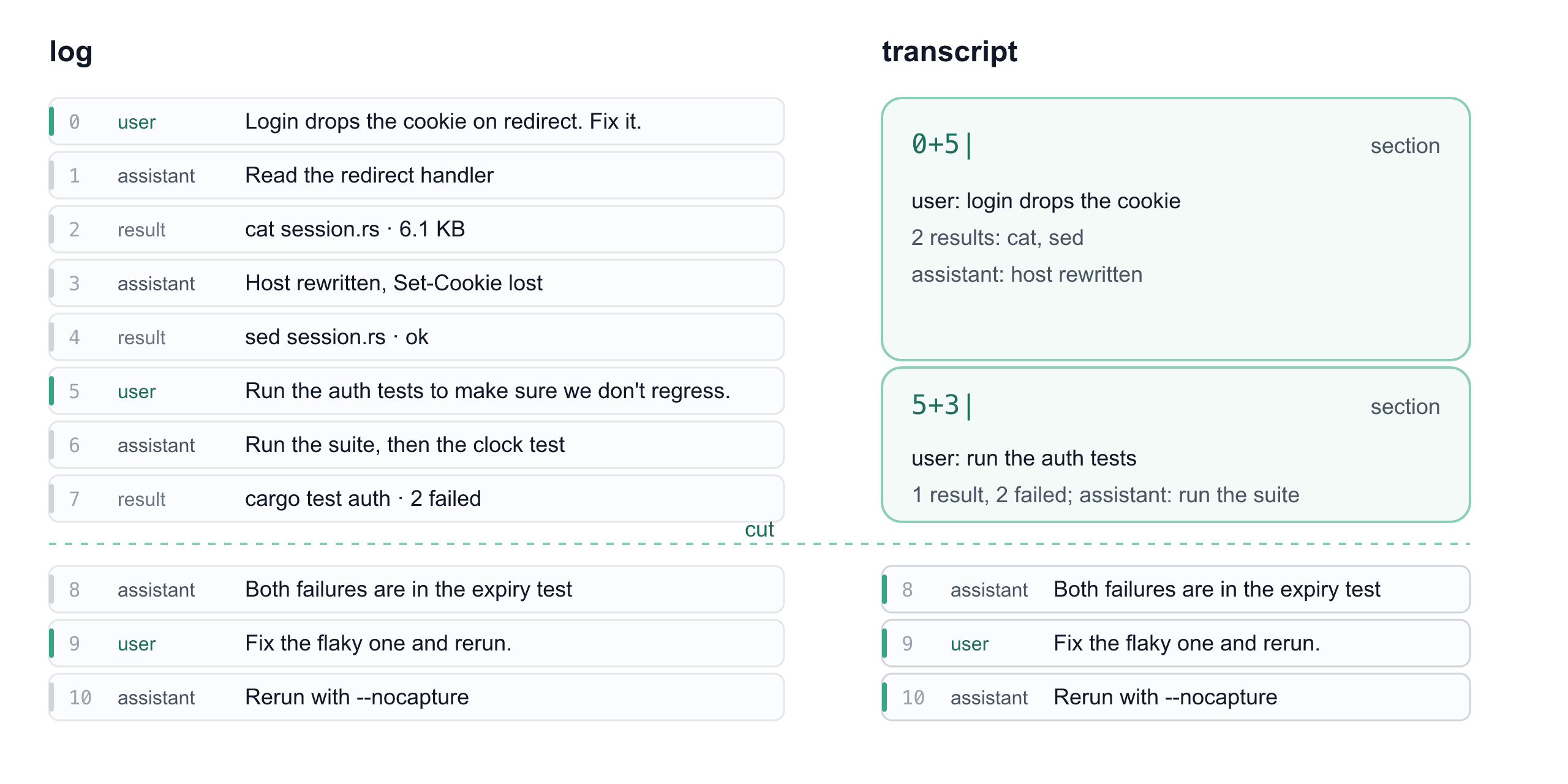
On the left, the full log; on the right, the transcript, which is sent at every step.
The old prefix is split into sections, and each section gets a digest. User messages are entirely kept (up to 8 KB), model responses are cut to two messages, and tool calls are summarized to the input command and its result. The tool output itself is dropped. There is no summarizer model, as there is no "message summarization".
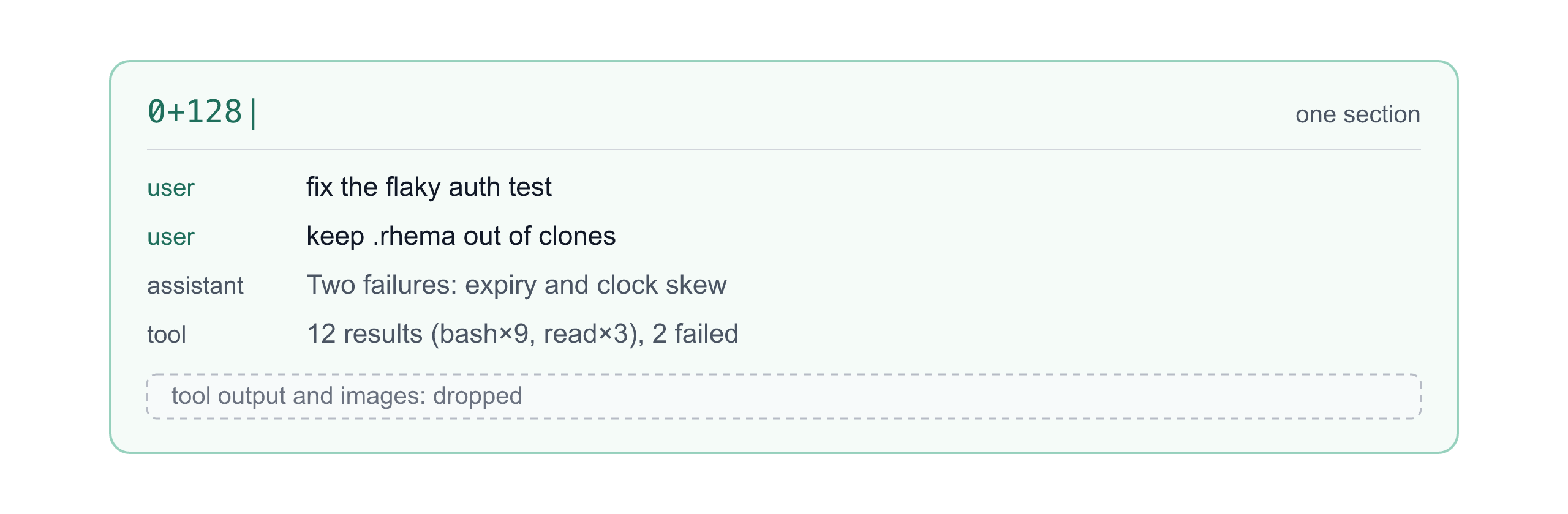
A section keeps every user text, up to two short assistant previews, and a count of what ran. Tool output is dropped.
By default, that digest costs no model call, adds no latency, and cannot be wrong about what happened. At worst, it is too short.
The log itself is never changed: the session keeps every message, and the view is built from it at request time. The recent messages (the band between the cut and the current turn) and the current turn are sent whole. Rhema does not blur the part the agent is working from.
The sections tile the old prefix. Each section is headed id+n|, and zoom(id, n) opens those n messages, paged at 8 KB, so anything the digest leaves out is reachable.
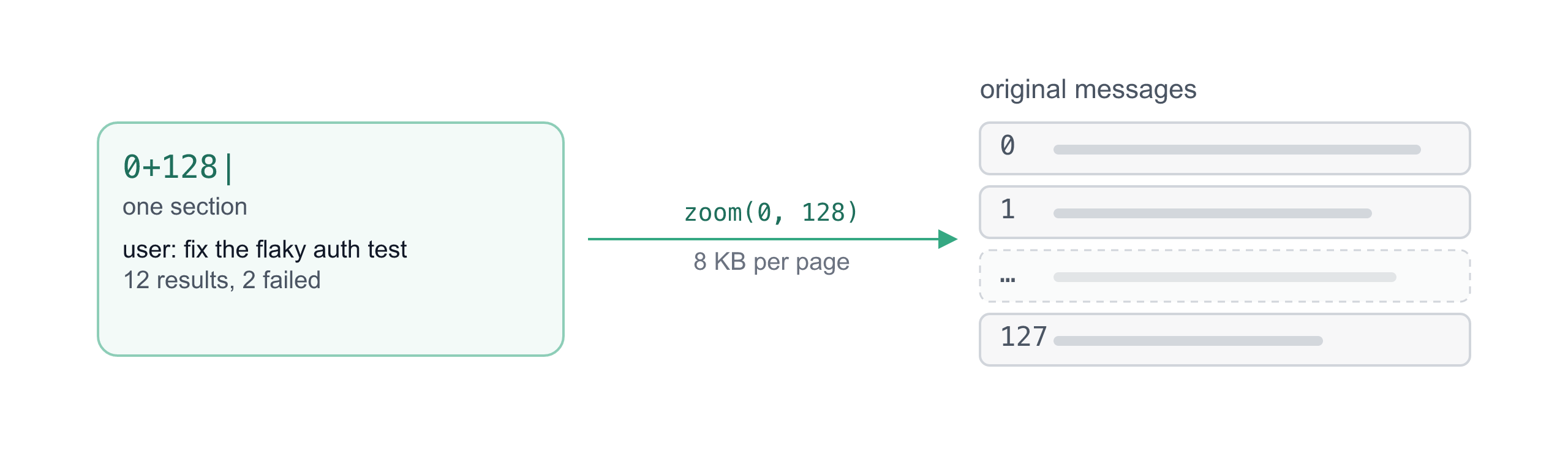
zoom reads the original messages back from the log, 8 KB at a time.
When the view goes over budget, Rhema flushes: the span that just left the band is cut into sections of roughly 24 KB of original messages, and each section is digested. The digests are what form the <transcript> block, which is capped at 32 KB.
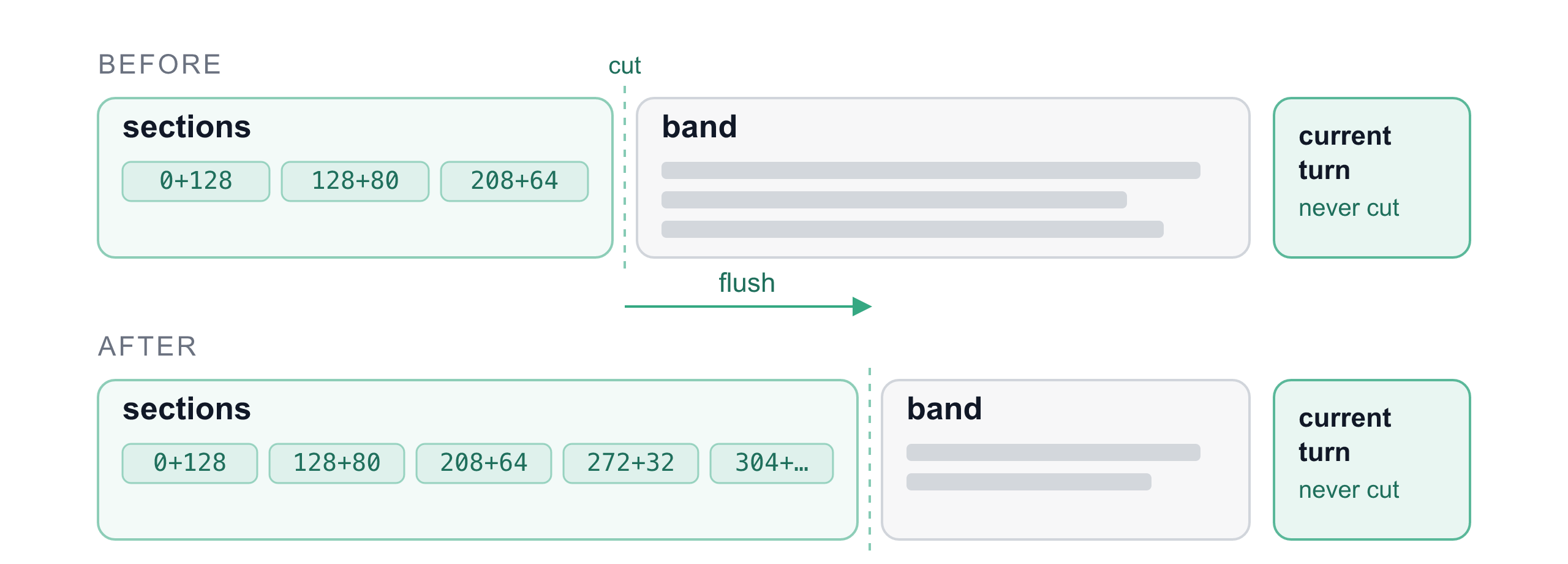
A flush moves the cut: the span that just left the band becomes sections, and the band shrinks.
Past that cap, the two oldest sections merge and are re-digested from the original messages. A merge rewrites the block and breaks the cached prefix, so it is kept rare. Between merges, sections are only appended, which keeps the prefix stable for prompt caching.
The idea of blurring the transcript comes from Victor Taelin's UniiChat. It compresses the log into a binary tree of one-line summaries; the view is a cut through that tree, oldest first, and zoom opens a line into the two lines it was made from, down to the message. The view holds only summaries, and the new user message is sent after it. Once the view passes 128 KB, it merges the most due pairs until it is back to 64 KB, so the view stays between 64 and 128 KB. For chat, that works well: messages are short, and a summary can stand in for them.
In Rhema, I tried to adapt that idea with coding/tool-calling applications in mind. I don't think it is perfect, but I must say that I don't see a difference in response quality with other harnesses, but I see a difference in cost and global usability for long sessions (I have never needed to compact a Rhema session, hence never implemented /compact). I'm sure my implementation is far from perfect, and it is not definitive either (I'm still playing with the parameters and all). Try it, and let me know!
Sandbox
When we discussed code mode and tools earlier, we talked about a bash tool that would be essential and allow the agent to basically use the computer through command-line tools for any kind of purpose. We assumed a local backend, i.e., implementing the bash tool with a plain exec("bash -c ${MODEL_OUTPUT}").
However, this is not the only solution at all. In fact, we could implement this with a call into bash running anywhere, like a remote SSH computer, a container or a VM, etc.
Let's call a generic space where we can run bash a sandbox.
Most harnesses will implement the local sandbox, i.e., running bash locally. This is just a choice though, and we can imagine a harness that lets you select any kind of sandbox backend.
This is particularly interesting for safety features and isolation. If you run a model you can't trust not to make mistakes that could damage your computer, you can select in your harness that the bash tool should be implemented by a microVM sandbox backend for example. This way, any new project would spawn a microVM containing a copy or unionfs mount of current folder, and agent deltas could be synced back to computer disk in a snapshotable-way by the harness, at every turn end.
The idea is also interesting because it lets you view the agent itself, meaning the core loop and session management, and its "hands", the tools, as two separate things. They do not even need to live on the same computer or platform.
There are many challenges to be discussed in this space, which I believe is moving right now. Should you just use a massive "dev" sandbox for every agent/every project? Install everything in there and let the agent play? Should you just give raw access to your computer, create another user on your computer, use light sandboxing mechanisms such as chroots+cgroups+namespaces (i.e., a container), heavier ones like virtualization, or even rent disposable cloud boxes? I don't believe there is an answer suited to everyone, as each individual will work on very different projects and have different workflows/preferences.
In any case, being able to decouple the harness itself from the sandbox is very interesting. Rhema allows that, and I would like to implement multiple backends, but each comes with its own challenges.
Decoupling
We have exposed different parts of tooling for AI agents:
- The interface, like Rhema Code, T3 Code, Orca, Claude Code TUI, etc. That is just the literal user interface that you use to interact with the harness.
- The harness, like the Rhema framework (
rhema-host-agent) underneath, the Claude Code harness ("Agent SDK"), the core Pi packages, etc. - The sandbox, which can just be
bash -cto your local machine, is the place where the model can actually execute shell calls, and read and edit files.
Decoupling those three can have interesting applications. For example, T3 Code can use any kind of harness underneath and orchestrate them, as it is just an interface on top (which still provides tools as MCP servers so that the model can show you different things on said interface). Another application is cloud agents: you can have an interface (web, or connecting via your desktop app or TUI) to a shared cloud agent that uses a separate sandbox. This way, the cloud agent can use cheap tier hosting to be always available, but the sandbox is only woken up/costing you money when the agent is actively using it (and the sandbox is the most expensive part, as all the compute runs there).
You can also have interfaces allowing you to control remote harnesses (T3 Code does that very well), local harnesses where the model can only act in a VM and not on your host computer, etc.
This also allows for multiplayer agents: shared agent interface where multiple people collaborate, talking with one or multiple agents. I started building such an interface on top of Rhema, that I called Rhema Together.
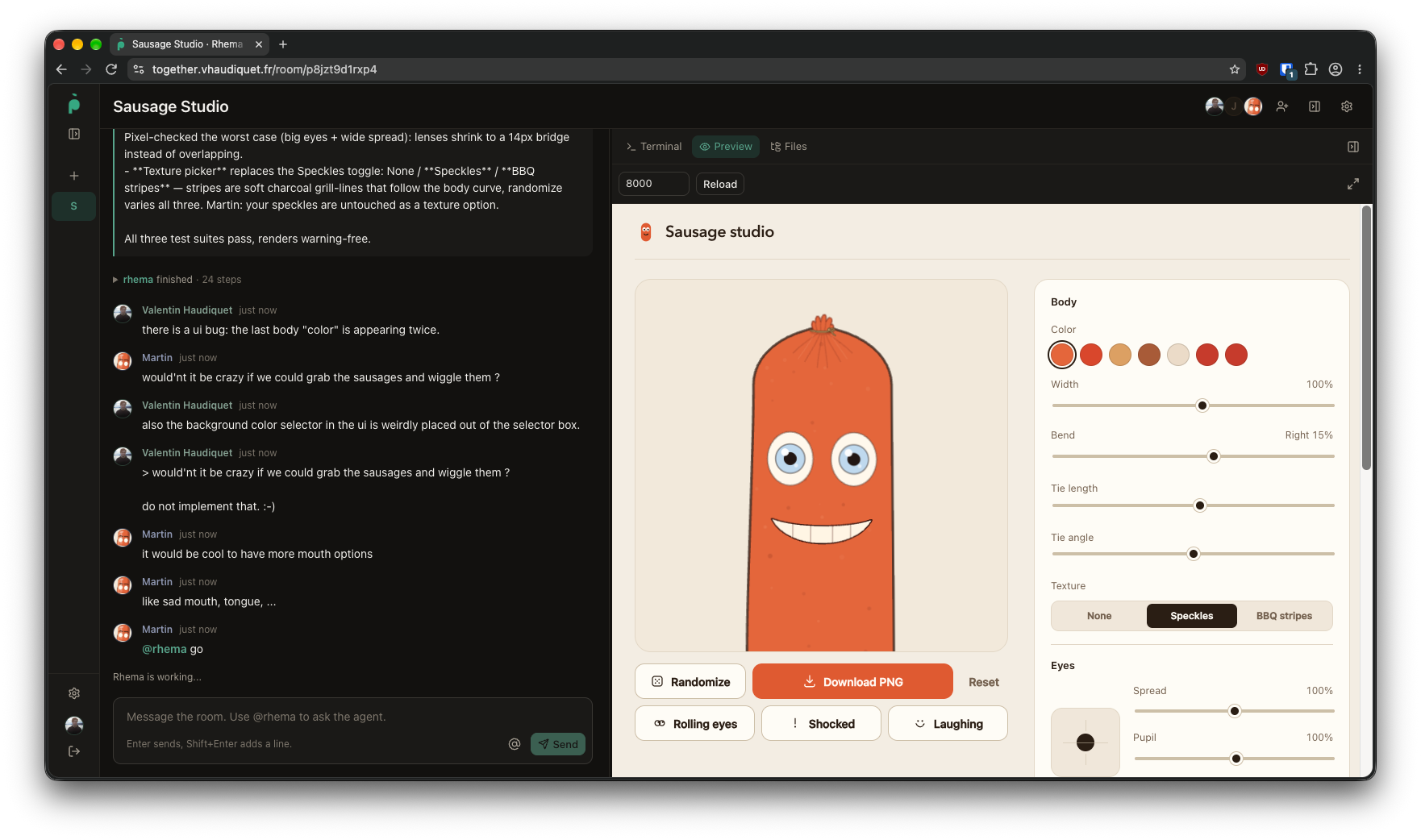
Building a fun HTML/CSS/JS sausage avatar builder with my friends in Rhema Together.
Rhema Together allows you to bring your own sandbox (which can just be a container in your local machine, if you expose that correctly and securely to the internet with an SSH key) and your own subscription. The harness lives on my server, the web interface is rendered on your web client.
Conclusion
In conclusion, I would like to speak about three things:
- How you can try my harness Rhema Code today
- Some of my views about software engineering and AI
- My ideas on what the technical future for harnesses could look like
Try Rhema Code
You can install Rhema Code today:
curl -fsSL https://get.rhema.rs/code | sh
Let me know what you think!
Rhema was also made as a fully modular Rust framework, with multiple crates, each implementing a feature. I'm currently trying to build other consumers on that framework, such as a "Claw". If you want, you can embed the full coding agent inside any interface: your own TUI, a GUI, but also a web browser, a VSCode extension, or whatever you like. At least that is my goal. For more details, check https://rhema.rs.
All of it is open-source, and you can check the code on GitHub:
Writing code and software engineering
I will be honest: I did not write a single line of code for Rhema or Rhema Code myself.
I used to be passionate about code itself. When I was in high school, I thought Python was the ugliest thing ever invented, and that C was the only language worth using for anything. I wrote a lot of C, I wrote my own operating system kernel in C as well as a few other projects.
I used to be a software engineer who thought about how beautiful code was. I always thought that code was art, and that there was no possible debate around this.
Now, I think a bit differently. I might have had a lot of ideas in the past, but most of my projects were only used by me, and I would abandon them every six months to start new stuff.
I was never a "product" person. I used to design stuff (either UI, or even CLI interfaces) that would be really bad, without realizing. I would then think "uh, weird, my software does not really feel good when I use it", without understanding why. And I would have to ask a friend who would tell me "but look, you put text grey-on-grey, contrasts are bad here, and you should add spacing, ...".
I was never an "architect" person either. I wanted to be one. I would write long technical documents in school on paper instead of listening in class, and go home excited to try and implement it all. But most of my specs either fell apart three minutes into implementation, or made the project so strange and bloated that it became unusable.
Now, I am a product person. I spend my time testing my product, trying to identify every gap, every small friction I have when using it. I plan for next features according to my needs, and I try to get early user testing from my friends and listen to them as well. I am also an architect. I prepare architectural decisions with a lot of care. I prepare documents that describe how that system should be implemented, how it should behave, what are its different states, etc. I cross-examine those documents and discuss with AI to make sure that there is no obvious gap in them.
Once I have defined, wearing my product hat, which features to build, and specified, wearing my architect hat, how they should behave and be implemented, I prompt with that spec. Then I check that the feature works.
I do not usually read the code, especially not for UI changes or minor modules. I do not care whether it looks pretty. For critical parts, I proofread every line or write by hand. This is the case for Rhema's system prompt. I asked the agent to keep it isolated in a SYSTEM.md file, allowing me to edit it directly in markdown. And I wrote it by hand.
I still think that code is art, and that code can be beautiful. But I am no longer that kind of artist: instead of creating and admiring code, I create and admire products. I am still an artist, but I build technical specifications and full-blown products now. At least that is how I try to see this revolution for my personal projects.

Designing a composer from Sketch Together YouTube channel describes some aspect of UI product design, and I can resonate with that nowadays.
Into the Future
This space is evolving really rapidly.
Last year, code editors with tab-completion were the only AI harnesses. Then, around February-May, Claude Code came out and TUI-interfaces over chat-based harness became a thing. A lot of exploration went into the interfaces, with GUI being developed, and orchestrators/ADEs coming up as a "universal interface" on top of any harness.
The harnesses themselves have evolved, but mostly in terms of techniques, like we described in this article. Perhaps their core will see a complete change again.
Maybe harnesses will become voice-first, and in the future nobody will even consider using a keyboard. Anomaly, the makers of OpenCode, recently released Hex, a speech-to-text app that you can use anywhere on your computer, including OpenCode. Ubuntu released Myna as well, which aims to integrate speech-to-text technology in the whole Ubuntu desktop.
Another path would be "super-agents". DeepSeek recently published Exploring Super-agent Design, which basically argues that nobody will directly use harnesses like Claude Code anymore. Instead, people would give those to a super-agent, and talk to the super-agent when they want to implement something. The super-agent would orchestrate coding harnesses to implement, review, test the feature and then ship it. Those super-agents would even be able to act on their own to fix user-reported issues, etc.
Nobody knows what the future holds, but there is a lot to explore and try, which is why I am happy to have my own framework to play with.
Read more
Below is a list of resources I found interesting while implementing my harness, some of which are cited in this post.
- What is a Harness? - Earendil
- Pi Durable - Earendil
- Pi Durable on Cloudflare - Earendil
- Code Mode: the better way to use MCP - Cloudflare
- Code Mode: give agents an entire API in 1000 tokens - Cloudflare
- You Said No MCP! - Earendil
- What if you don't need MCP at all? - Mario Zechner
- What is Codemode - Armin Ronacher
- Code execution with MCP - Anthropic
- Tools - OpenCode
- Snapcompact: SoTA compaction - Can Bölük
- UniiChat: one chat that never ends - Victor Taelin
- What is a "harness"? - Theo - t3.gg
- Why Agents Are Soon Only Going to Have 1 Tool
- Exploring Super-agent Design - DeepSeek